
How to Check SIM Cards Issued in Your Name Online in India (Step-by-Step Guide)
Title
Check SIM Cards Issued in Your Name Online | Sanchar Saathi Guide
Learn how to check all SIM cards issued in your name using the official Sanchar Saathi government portal. Report and deactivate unknown SIM cards online easily.
Introduction
In India, cyber fraud and identity misuse are increasing rapidly. Many people are shocked to discover that unknown SIM cards are issued using their Aadhaar or identity, which later get involved in scams or criminal activities.
To solve this problem, the Government of India has introduced the Sanchar Saathi Portal, which allows citizens to check all mobile numbers issued in their name online and report unauthorized SIM cards instantly.
This article explains the complete step-by-step process in simple language.
Government Rules for SIM Cards in India|
How to Check SIM Cards Issued in Your Name
According to government regulations:
-
A maximum of 9 SIM cards can be issued on one individual’s name
-
All mobile connections are linked using Aadhaar-based eKYC
-
Citizens can legally check, report, and deactivate unwanted SIM cards
Why You Must Check SIM Cards Issued in Your Name
How to Check SIM Cards Issued in Your Name
Checking your SIM card details is important because:
-
Fraudsters may misuse your identity without your knowledge
-
Unknown SIM cards can be used for cybercrime or illegal activities
-
Reporting gives you official government proof
-
It helps you stay legally safe in case of future investigations
Official Website to Check SIM Cards in Your Name
The Government of India provides this facility through its official portal:
Sanchar Saathi (Citizen Centric Services)
Official Website: www.sancharsaathi.gov.in
This is a secure and government-authorized platform.
Step-by-Step Guide to Check SIM Cards Issued in Your Name
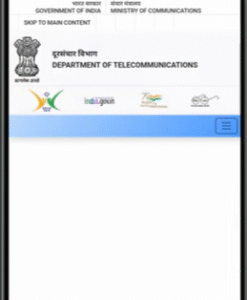
Step 1: Open the Sanchar Saathi Portal
-
Open your mobile or desktop browser
-
Search for Sanchar Saathi .
-
Open the official government website: www.sancharsaathi.gov.in
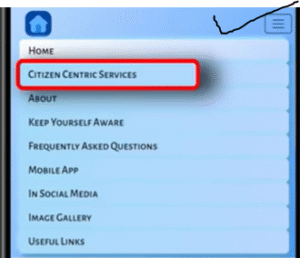
Step 2: Access Citizen Centric Services
-
Click on the three-line menu (☰)
-
Select Citizen Centric Services
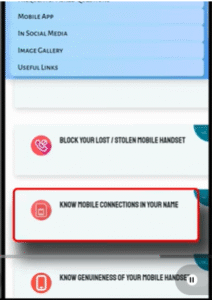
Step 3: Select “Know Mobile Connections in Your Name”
-
Click on “Know Mobile Connections in Your Name”
-
This option shows all mobile numbers linked to your Aadhaar
Step 4: Enter Your Mobile Number
-
Enter your Aadhaar-linked mobile number
-
Fill the captcha code carefully (case-sensitive)
-
Click on Validate Captcha
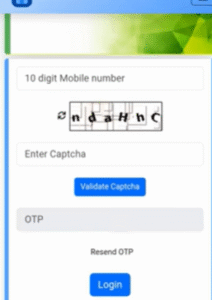
Step 5: OTP Verification
-
An OTP will be sent to your mobile number
-
Enter the OTP
-
Click on Login
View All SIM Cards Linked to Your Aadhaar|
Step-by-Step Guide to Check SIM Cards Issued in Your Name
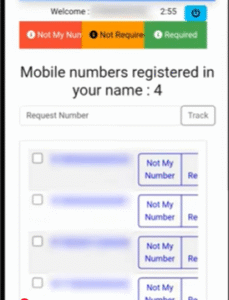
After logging in, you will see:
-
A complete list of all SIM cards issued using your Aadhaar
-
Both active and inactive mobile numbers
-
Telecom operator details for each number
If you notice any number that you do not recognize, immediate action is recommended.
What to Do If You Find an Unknown SIM Card
The portal provides three options for each number:
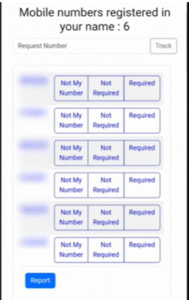
Not My Number
-
Select this if the SIM was never taken by you
-
Best option for fraud prevention
Not Required
-
Select this if the SIM was previously yours but is no longer needed
Required
-
Select this for SIM cards that are actively used by you
How to Report an Unauthorized SIM Card
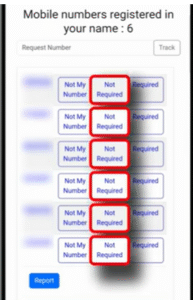
Follow these steps:
-
Click on the unknown mobile number
-
Select “Not My Number”
-
Confirm by clicking OK
-
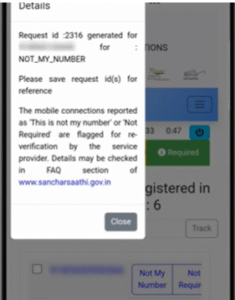
A complaint reference number will be generated
This confirms that your request has been officially registered on the government portal.
What Happens After You Report a SIM?
-
The telecom operator is instructed to perform re-eKYC
-
The person using that SIM must verify identity
-
If re-eKYC is not completed on time, the SIM card is deactivated automatically
How to Track Complaint Status
You can track your request anytime:
-
Visit the Sanchar Saathi Portal
-
Go to Citizen Centric Services
-
Login using OTP
-
Enter your reference number
-
Click on Track Status
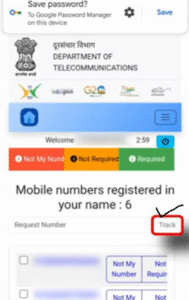
Once resolved, the unauthorized number will be removed permanently from your list.
Benefits of Using the Sanchar Saathi Portal
-
Official Government of India platform
-
Free and easy to use
-
Provides legal proof of reporting
-
Protects you from cybercrime
-
SMS updates for every status change
Frequently Asked Questions (FAQ)
Step-by-Step Guide to Check SIM Cards Issued in Your Name
How many SIM cards can be issued on one person’s name in India?
A maximum of 9 SIM cards are allowed per individual.
Is the Sanchar Saathi portal safe to use?
Yes, it is a government-authorized and secure portal.
Can I deactivate an unknown SIM card online?
Yes, you can report and deactivate it directly through the portal.
Final Words
Step-by-Step Guide to Check SIM Cards Issued in Your Name
Every mobile user in India should check their SIM card status at least once. If you find any unauthorized number and report it, you receive official government proof, which keeps you protected in case of misuse.
Stay alert, stay safe, and always keep track of your mobile connections.